
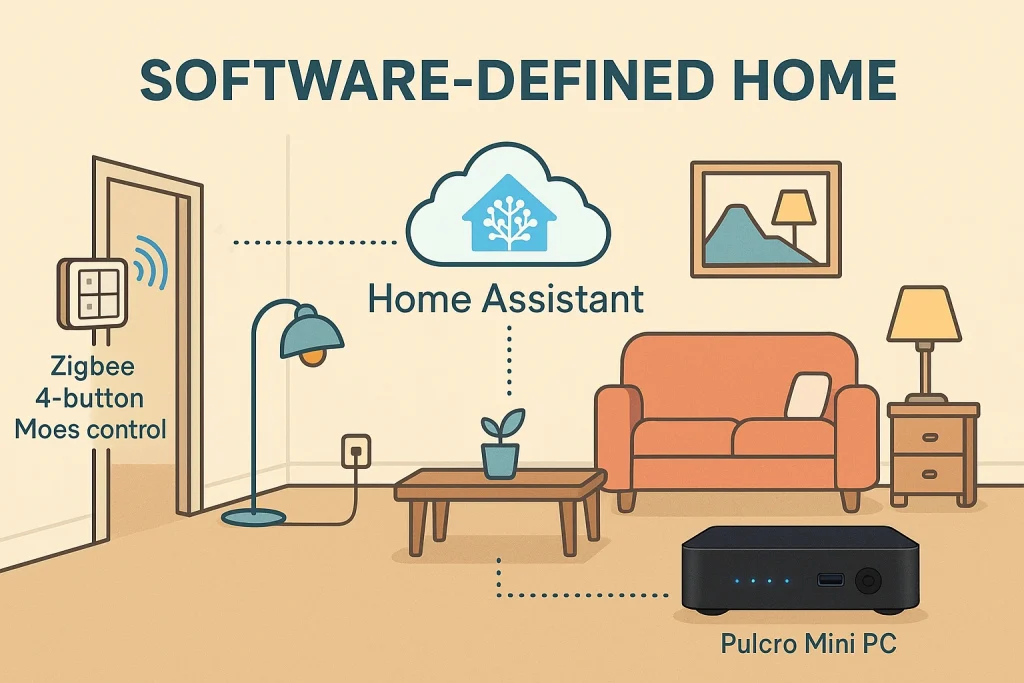
Imagine standing in your living room late at night. The house is quiet, you are halfway up the stairs, and you realize that you forgot to turn off the lamp across the room. There is a switch near the lamp, but nothing where you are standing. You have two options – you walk back down or you leave it on and accept the wasted energy.
The reason it works this way is not your fault. It is the way homes have been built for decades. A switch is wired to a circuit, and that circuit powers the light. If you want another switch to control the same light, you need more physical wiring. Electricians call this a three way or four way configuration. The rest of us call it “cutting drywall” and “paying for a day of work.”
Now, imagine a different world. On the wall by your stairs is a small, battery powered wireless button. When you press it, that same lamp across the room toggles instantly. No new wires were run. No ceilings were opened. The original switch can even stay exactly where it is. The electrical wiring did not change at all, but your experience did.
That is the starting point of the Software Defined Home – a home where physical wiring is no longer the main source of truth for how things behave. The wires still deliver power. The difference is that control moves into software, orchestrated by a platform like Home Assistant, running on a dependable hub such as a Home Assistant mini PC.
In this white paper, we will explore what “software defined” really means, how it applies to the smart home, why Home Assistant is uniquely positioned as the brain of this new model, and how dedicated hardware – like Pulcro.io TurnKey Mini PCs and a simple Zigbee Smart Home Starter Kit – can make it practical for both enthusiasts and everyday homeowners.
2. What Does “Software Defined” Really Mean?
The term “software defined” did not start in living rooms. It comes from the worlds of networking and data centers, where engineers have spent the last decade trying to solve a similar problem – hardware was rigid, difficult to reconfigure, and expensive to change.
In traditional networks, every switch, router, and firewall had its own configuration. You logged in, edited a few lines of config, and hoped you did not break anything else along the way. Large environments with hundreds or thousands of devices became incredibly complex to manage.
Software Defined Networking (SDN) changed that. Engineers realized they could separate the physical hardware from the control logic. The hardware – switches and routers – stayed in place, but a central software controller now defined how traffic should flow. Instead of thinking in terms of ports and cables, teams began thinking in terms of policies and applications:
- “This application needs priority bandwidth.” – or –
- “This department must not see this other department.” – or –
- “These services need isolation and redundancy.”
The physical network became a pool of forwarding devices. The intelligence – the “why” and “when” – moved up into software.
The same idea appeared in software defined storage and software defined data centers. Hardware still mattered, but it was no longer the limiting factor. The real power came from a flexible, programmable control plane on top.
1. Physical Layer (hardware, wiring, circuits)
    v
2. Abstraction Layer (drivers, protocols)
    v
3. Control Plane (software rules, logic, automation)
    v
4. User Experience (apps, dashboards, buttons, voice)
The Software Defined Home follows that same pattern:
The physical wiring and circuits in your house are still there. Your breakers, outlets, and light circuits continue delivering power. What changes is where the decisions are made. Instead of letting copper wiring define what a switch can or cannot do, a software layer – Home Assistant – becomes the brain that maps events (buttons, sensors, time, presence) to actions (lights, plugs, scenes, notifications).
Put simply: The home becomes programmable.
3. From “Hardware Defined” To Software Defined: Rethinking Wiring
Most houses today are still “hardware defined.” When the home was built, the electrician made a series of decisions (with the NEC Electrical Code in mind) about where switches go, which light they control, and how circuits are routed through the walls. Those decisions are literally embedded in plaster and copper.
If a dining room light can only be controlled from one wall, it is because a wire connects that switch to that circuit. If you want control from a second location, you need more wire. If you want to move that switch to another wall, someone will likely have to cut drywall. The behavior is not flexible because it is physically encoded in the building materials.
In a Software Defined Home, we keep the physical wiring as a power delivery layer, but we move control into the software layer. A switch becomes an event source, not a fixed, wired relationship. A light becomes an endpoint, not a single-use load.
Traditional model:
  "This switch is wired to that light."

Software defined model:
  "When this button is pressed, run this automation,"
  "and that automation can control any combination of lights."
3.1 A Wireless 3 Way Switch with No Drywall Dust
Consider a concrete example. You have a floor lamp plugged into a wall outlet on one side of the room. You would like to control it from near the entryway and from your favorite chair, just like a three way setup, but the house was never wired for it.
In the old world, you would:
- Hire an electrician.
- Run new wire between switch locations.
- Possibly modify the existing circuit.
- Patch and paint after the work is done.
In the Software Defined Home world, you can:
Plug the lamp into a smart plug, such as a Zigbee or WiFi controlled outlet that Home Assistant can see. Then mount a small, battery powered Zigbee wall controller (for example, a four button Moes switch) on the wall by your entryway and another near your chair. No wires are needed for these controllers. They simply speak Zigbee to your smart home hub.
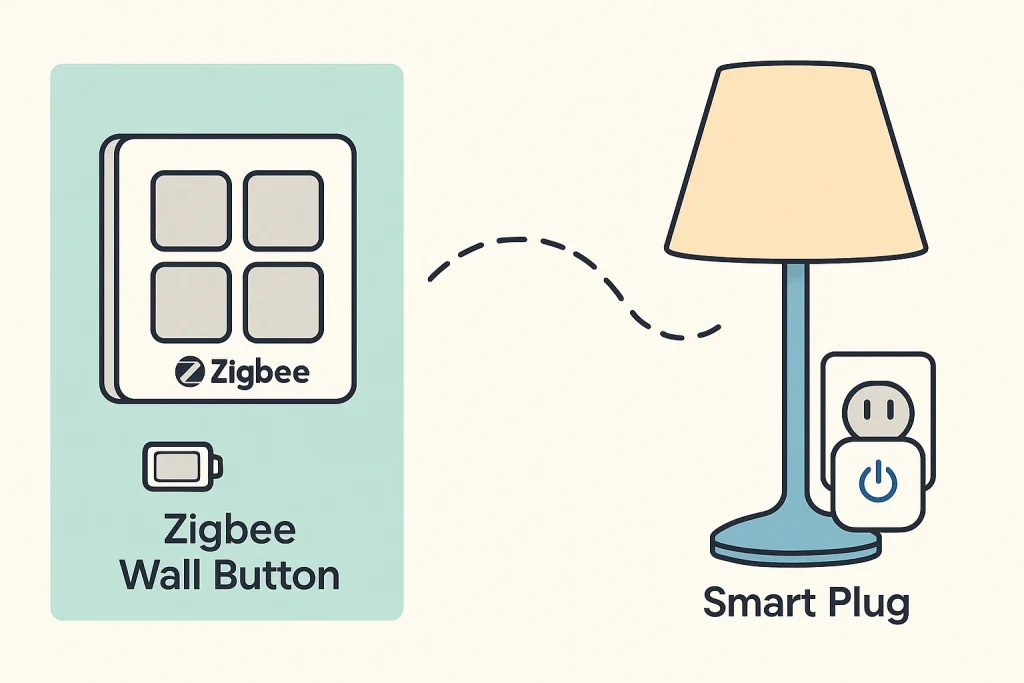
In Home Assistant, you define a simple automation: “When Button 1 on the Moes controller is pressed, toggle the smart plug named ‘Living Room Lamp’.”
You have just created a virtual three way switch. In reality, you can have three, four, or ten controls if you want. They are all just events that Home Assistant uses to change the state of the lamp. The wiring never changed. The lamp still gets power through the same outlet. What changed is how you think about control.
3.2 A Downlight And Switch On Separate Circuits
Now think about a downlight in your hallway. It is wired to a ceiling circuit that the builder chose. The switch at the end of the hall controls it. That is the conventional model.
In a software defined model, you can install a Zigbee or WiFi smart downlight that stays powered all the time. It is not turned on or off by cutting power with a wall switch. Instead, it listens for commands from Home Assistant.
You then mount a battery powered wireless button near your bedroom door. That button is not on the same electrical circuit as the light, and it does not need to be. It does not carry mains power. It simply sends a signal that Home Assistant receives.
In Home Assistant, you define: “When this bedside button is pressed, toggle the hallway downlight. If it is between 10pm and 6am, set the brightness to 20 percent and use a warm color temperature.”
You can also place another wireless button by the garage door. It is on yet another circuit. It does not matter. Both buttons become input events. The downlight is just one of many outputs they can drive through software logic.
The home is starting to feel less like a fixed electrical drawing and more like a living system that you can shape over time.
3.3 Scenes And Routines That Ignore Physical Layout
Once you get comfortable with the idea that “buttons are events” and “lights are software controlled endpoints,” your thinking naturally expands beyond one to one relationships.
A button at your bedside might now:
- Turn off every downstairs light that Home Assistant knows about.
- Lock your smart front door and garage entry door.
- Set your thermostat to a night time temperature.
- Lower the brightness of all hallway lights to a gentle night mode.
None of these devices share a breaker. Some may be Zigbee, others WiFi, others use local network APIs. From a traditional wiring perspective, they are scattered across the house. From a software defined perspective, they are simply entities that the smart home brain can coordinate.
The wires still deliver power. The logic lives in Home Assistant.
4. The Architecture of a Software Defined Home
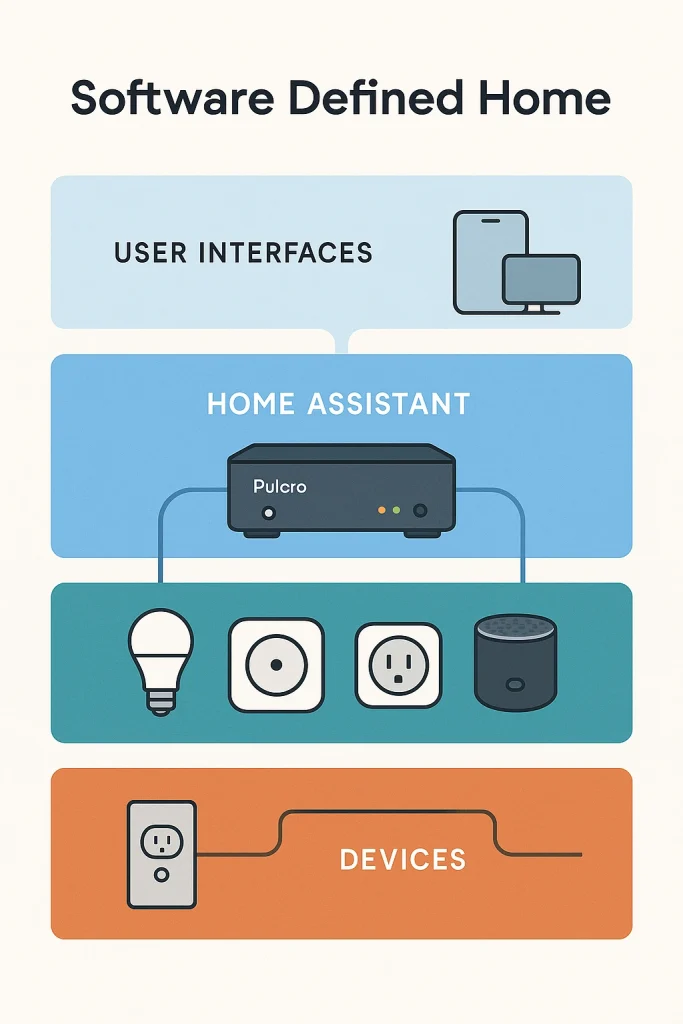
It can be helpful to think of the Software Defined Home as a layered system. Each layer has a clear role. Together, they form a stack that is flexible, resilient, and much easier to evolve than physical wiring alone.
Layer 4 - Experience Layer
  Apps, dashboards, voice assistants, wall tablets

Layer 3 - Control and Automation Layer
  Home Assistant, automations, scenes, schedules, logic

Layer 2 - Device and Protocol Layer
  Zigbee, Z-Wave, WiFi, Bluetooth, bridges, APIs

Layer 1 - Power and Physical Layer
  Circuits, outlets, breakers, fixtures, existing wiring
At the bottom, the Power and Physical Layer is your existing electrical system. It is important, but you rarely want to touch it once a house is finished. Rewiring is expensive. Patching walls is inconvenient. So we treat this layer as stable and do not rely on it to express logic.
Above that, the Device and Protocol Layer is where your smart endpoints live. This includes smart plugs, smart switches, downlights, sensors, thermostats, locks, and cameras. They may speak Zigbee, Z-Wave, WiFi, Bluetooth, or vendor specific cloud APIs. Bridges like a Zigbee USB coordinator or a Z-Wave stick connect this layer back to the automation brain.
The Control and Automation Layer is where Home Assistant sits. This is the heart of the Software Defined Home. It listens to events from devices and services, maintains state, and runs automations based on rules that you define. It is the software control plane, just as in software defined networking.
At the top, the Experience Layer is where you interact with the system – dashboards on your phone, a tablet on the wall, physical buttons, and even voice assistants like Google Assistant or Alexa. These are interfaces, not brains. The important decisions are made in the layer below, inside Home Assistant.
The most important insight for homeowners, enthusiasts, and technical professionals is this:
You do not need to rebuild your house to gain the benefits of a Software Defined Home. You only need to add smart endpoints and a reliable automation brain.
5. Home Assistant – The Operating System Of The Software Defined Home
If the Software Defined Home is a concept, Home Assistant is the way you make it real. Home Assistant has grown into the de facto open platform for local first smart home automation. It brings together thousands of integrations with a single goal – unify your devices and data into one coherent system that you control.
5.1 A Bridge Between Brands, Protocols, And Generations
In many homes, smart devices arrive one at a time. A WiFi smart plug here, a Zigbee light bulb there, a vendor specific cloud connected thermostat, a robot vacuum with its own app. Each product solves a small problem, but each also brings another ecosystem along with it.
Home Assistant sits above all of that. It speaks Zigbee, Z-Wave, and WiFi. It can talk to hubs from Philips Hue, Lutron, and others. It connects to vendor APIs when needed. It can even integrate with routers, media systems, and network storage. Instead of juggling half a dozen apps, you see one unified view of your home.
This is essential for a Software Defined Home, because your automations are not limited to one brand or protocol. You can happily combine:
- A Zigbee motion sensor in the hallway.
- A WiFi smart switch controlling a fan.
- A local API integration with your AV receiver.
- A smart lock using a different protocol altogether.
In Home Assistant, they are all entities. They are peers. The protocol becomes an implementation detail, not a barrier.
5.2 Rich Automations As The New “Wiring Diagrams”
In a traditional house, your wiring diagram is drawn in copper. In a Software Defined Home, your wiring diagram is written as automations. Home Assistant lets you define automations visually, through blueprints, or for power users, through YAML.
A simple example might be: “If the motion sensor in the hallway detects movement after sunset, and the living room TV is off, turn on the hallway light to 40 percent for five minutes.”
A more elaborate one might be: “When the last person leaves home, lock all doors, turn off all lights, shut down any non essential smart plugs, and set the thermostat to away mode.”
These automations capture context – time, presence, device state, and even location. They allow your home to respond intelligently rather than mechanically. You are no longer limited to what can be wired through a single switch box.
5.3 Local First, Cloud Aware
One of the key reasons Home Assistant is well suited to a Software Defined Home is its local first philosophy. Many vendor ecosystems depend heavily on cloud servers. If the internet connection goes down or the vendor has an outage, your “smart” devices can become unreliable or even unresponsive.
Home Assistant runs locally, on your own hardware. For critical functions like lights, locks, and environmental control, local control means:
- Your automations continue to run when your internet is down.
- Device response times are typically lower and more consistent.
- Your data stays in your home whenever possible.
Home Assistant can still leverage cloud integrations and remote access when you want them, but they enhance the system instead of owning it. For a Software Defined Home that should continue working for years, regardless of vendor decisions, that independence is vital.
6. Why Big Tech Assistants Are Not Enough
Many people experience their first taste of smart home control through platforms like Google Home, Amazon Alexa, or a cloud service like IFTTT. These systems are convenient, easy to start with, and excellent for voice commands and simple routines. They serve as a useful entry point.
However, as you begin to think in terms of a Software Defined Home, their limitations become clear.
6.1 Limited Cross Brand Depth
Voice assistants are very good at “turn on the living room lights” or “set the thermostat to 72.” They are less capable when you want rich, multi device behavior that combines different brands and deep device capabilities.
You might find that:
- Some devices only expose a subset of their capabilities to Google Home or Alexa.
- More advanced automations require awkward workarounds or are not possible at all.
- Cross vendor coordination can be shallow or inconsistent.
Home Assistant, by contrast, is designed as a multi vendor, multi protocol platform from the start. It can often see and use capabilities that voice assistants gloss over.
6.2 Simple Routines Instead Of A True Control Plane
Most Big Tech assistant platforms support “routines” – if this, then that style flows. But there are usually practical ceilings:
- Limited logic beyond simple conditions.
- Difficulty combining many devices and states into one coherent behavior.
- Few built in tools for debugging or understanding why something did or did not run.
In a Software Defined Home, your automation platform needs to be more than a trigger list. It must act as a control plane that understands state over time (is anyone home, is it nighttime, what is the temperature, what is currently playing on the TV), and respond with nuance.
Home Assistant gives you that richer view of your home and the tools to act on it.
6.3 Cloud Reliance And Longevity
Finally, Big Tech platforms are cloud native. They rely on vendor infrastructure to function. While that works most of the time, it means:
- Outages or service changes can break routines.
- Feature changes can alter how your setups behave, without your control.
- Long term support for specific integrations is outside of your influence.
In a Software Defined Home that you plan to live in for years, maybe decades, a local first control platform provides a stability that is hard to achieve with cloud only solutions.
This does not mean you have to give up voice control. In fact, many Home Assistant users integrate Alexa or Google Assistant as interfaces to their Home Assistant powered home. The key is that the brain of the home – the control plane – resides locally, often on a dedicated mini PC.
7. Why Dedicated Hardware Still Matters
A Software Defined Home rests on a simple idea – if software is going to coordinate your lights, locks, climate, and more, that software needs a reliable place to run. This is where dedicated hardware enters the picture.
You can run Home Assistant on many platforms, including single board computers and spare PCs. For experimentation and testing, that can work well. But as your home begins to depend on automations, stability, resilience, and performance start to matter more.
At Pulcro.io, we design TurnKey Mini PCs to serve exactly this sort of role – compact, efficient machines that are built to run 24/7 as the brain of your Home Assistant powered Software Defined Home.
7.1 Pulcro TurnKey Two And TurnKey QBE As Smart Home Hubs
The Pulcro TurnKey Two and Pulcro TurnKey QBE are examples of this philosophy in hardware. They combine energy efficient modern processors with solid state storage and enough memory to comfortably run Home Assistant and its supporting services.
On a Pulcro TurnKey Two, for example, you can run:
- Home Assistant OS directly on bare metal, for a dedicated smart home appliance, or
- Proxmox with a Home Assistant virtual machine, alongside other services like media management or a small file server.
The TurnKey QBE offers a compact cube style form factor that fits neatly into home entertainment setups or network cabinets. Both devices are capable of serving as the central Home Assistant hub, coordinating Zigbee, Z-Wave, and WiFi devices across your home.
When deployed as a Home Assistant mini PC, a TurnKey Two or TurnKey QBE becomes your local automation brain – quiet, efficient, and always on, with the performance headroom to grow as your Software Defined Home becomes more capable.
7.2 A Starter Onramp: Zigbee Smart Home Starter Kit
For people just starting their journey toward a Software Defined Home, it can be overwhelming to choose protocols, devices, and hubs. To simplify the first step, Pulcro.io offers a Zigbee Smart Home Starter Kit designed to pair naturally with Home Assistant.
The kit includes a Zigbee 3.0 USB coordinator dongle and a small set of compatible devices, such as smart plugs and sensors, giving you everything you need to:
build your first Home Assistant automation with confidence.
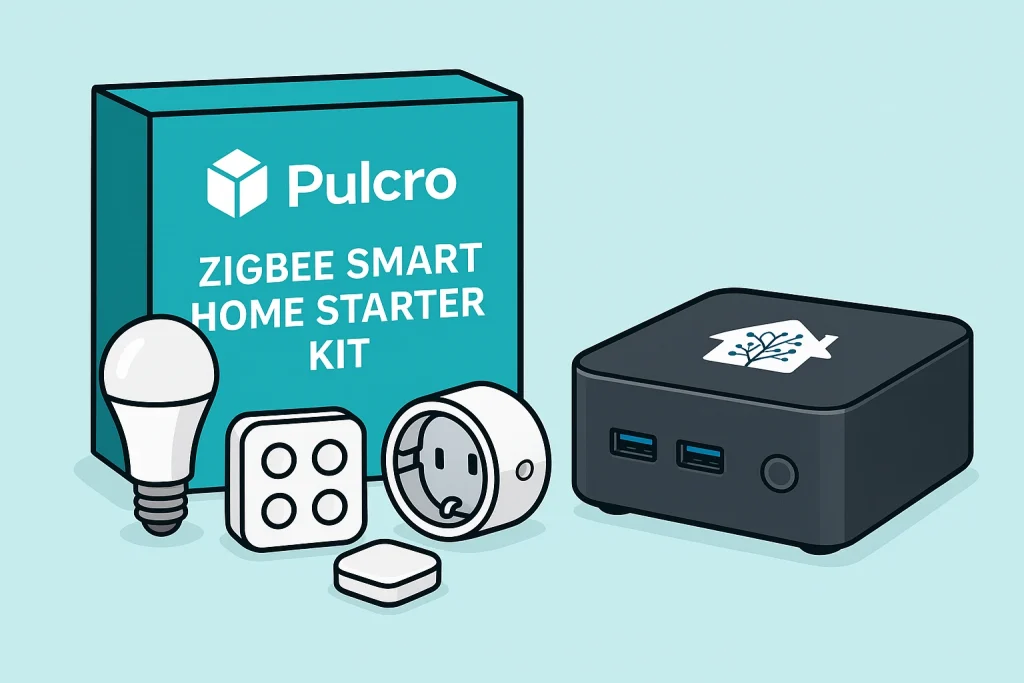
Paired with a TurnKey Two or TurnKey QBE running Home Assistant, this starter kit acts as your onramp to a fully software defined environment. You can start small – a single lamp or hallway light – and grow steadily without having to rethink your core architecture.
8. A Practical Roadmap To Building Your Software Defined Home
The Software Defined Home is a long term direction, not a weekend project. The good news is that you can approach it in stages. Each stage adds new benefits. None of them requires tearing out walls.
8.1 Step One – Establish The Brain
The first step is to choose and set up your Home Assistant hub. For a home that you expect to live in for years, it is worth using dedicated hardware.
A practical starting point looks like this:
- A Pulcro TurnKey Two or TurnKey QBE as your Home Assistant mini PC.
- Home Assistant OS or Proxmox with a Home Assistant virtual machine installed.
- A Zigbee USB dongle from the Zigbee starter kit, plugged into the mini PC.
- Network connectivity to your home router or switch.
Once Home Assistant is up, you have a stable control plane. You can now add devices at your own pace, knowing they will all plug into the same brain.
8.2 Step Two – Start With One Satisfying Use Case
The best way to build confidence is to solve one small, but meaningful problem. A great example is a lamp or downlight that you regularly forget to turn off, or a hallway that would benefit from motion controlled lighting.
For instance:
Scenario: A bedside button that turns off all downstairs lights and sets a night time scene.
With Home Assistant and a few devices, you can do the following:
- Plug a few key lamps into Zigbee smart plugs.
- Install a Zigbee wall button near your bed.
- Define an automation that, when the button is pressed after 9pm, turns off those lamps, lowers hallway lights, and locks the front door if it is not already locked.
This small routine already demonstrates the power of a Software Defined Home – one action influences multiple devices, across different physical circuits, with time based conditions.
8.3 Step Three – Add Sensors For Context
Buttons and smart plugs are a good start, but sensors unlock the real intelligence of a software defined environment.
Adding motion sensors in hallways and bathrooms, contact sensors on doors and windows, and temperature sensors in key rooms allows Home Assistant to adapt behavior to your life. You can create automations like:
- “If motion is detected in the hallway between midnight and 5am, turn on lights to a gentle 20 percent brightness.”
- “If the front door opens after sunset and the living room is dark, turn on the main light and a side lamp.”
- “If the nursery temperature rises above a threshold while the window is closed, turn on the fan or send a notification.”
These automations are not tied to specific wiring layouts. They are tied to events and conditions. As you move devices around, reconfigure rooms, or add new hardware, you adjust automations rather than wiring.
8.4 Step Four – Unify Media, Comfort, And Security
With a stable Home Assistant hub and a growing catalog of devices, the next step is to integrate your comfort, media, and security systems.
Many people start with:
- Connecting their smart thermostat to Home Assistant.
- Integrating TVs, AV receivers, and speakers.
- Adding smart locks and garage door controllers.
- Integrating cameras and doorbells where appropriate.
Once these are in Home Assistant, you can build scenes such as:
“Movie Night” – dim lights, close blinds, set the thermostat slightly cooler, and power up the media system with one tap or button press.
“Away Mode” – adjust temperatures, turn off interior lights, activate presence based automations to make the home look occupied, and ensure all doors are locked.
Each of these scenarios draws from multiple protocols and brands, but Home Assistant treats them as one cohesive environment.
8.5 Step Five – Seasonal And Event Based Intelligence
As your Software Defined Home matures, the final layer is to make it seasonally aware and aligned with your life events. This might involve:
- Different lighting and comfort behavior in winter versus summer.
- Holiday scenes that change exterior and interior lighting on a schedule.
- Adjustments for vacations, weekends, and guests.
For example, as explored in our separate article on how Home Assistant and a TurnKey Two mini PC can make the holiday season brighter, you might have: “At sunset in December, gently bring up the warm white lights around the living room, turn on the smart plug controlling the holiday tree, and play a specific playlist on your speakers, all coordinated by Home Assistant.”
This is where the Software Defined Home truly feels alive. Your house is no longer a static object – it is a platform for experiences.
9. The Most Important Shift – Power Versus Control
Underneath all of the examples and architecture diagrams, the Software Defined Home rests on one simple mental shift:
Use your existing electrical wiring primarily to deliver power. Use Home Assistant and software to deliver control.
When you separate power from control in your mind, many new possibilities open up:
- You realize that a switch does not have to be physically wired to a light to control it.
- You understand that devices on different circuits can be part of the same scene.
- You stop seeing “the way the builder wired it” as a permanent limitation.
Instead, you see your home as a canvas. Smart plugs, switches, lights, sensors, and locks are your building blocks. Home Assistant is your control plane. Your Pulcro TurnKey Mini PC is the reliable, always on brain that holds it together.
10. Conclusion – Your Home As A Platform, Not A Fixed Diagram
The Software Defined Home is not a single product or a one time project. It is a way of thinking about your house:
Power is provided by the wiring you already have. Control is defined in software. Your “wiring diagram” becomes a set of automations and scenes that can evolve as your life changes, as your family grows, and as new technologies appear.
With Home Assistant as the brain, a dedicated Home Assistant mini PC like the Pulcro TurnKey Two or TurnKey QBE as the platform, and a simple Zigbee Smart Home Starter Kit as your first set of building blocks, you can gradually transform a conventional house into a flexible, resilient, and deeply personal Software Defined Home.
You do not have to be a professional engineer to begin. You do not have to rewire your home. You only need curiosity, a willingness to experiment, and a central hub that you trust to keep running quietly in the background.
From there, each new device and each new automation is another line in your home’s story – a story that is no longer written in copper, but in software that you can understand, adjust, and improve.
The future of the smart home is not about more apps or more cloud accounts. It is about homes that are software defined, locally controlled, and built around the people who live in them. With Home Assistant and a solid foundation of Pulcro.io hardware, that future can start in your home today.